Spooky Ghoster: Integrating a Display Font into Seasonal Design Workflows
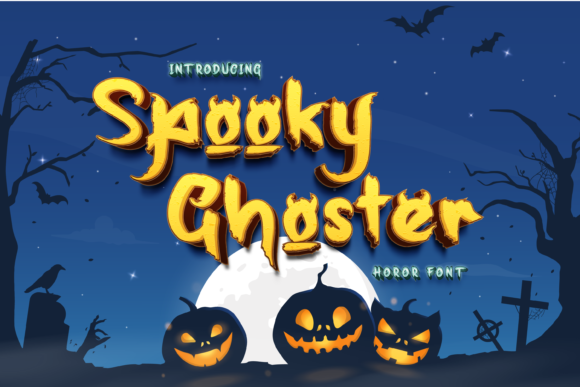
In the realm of graphic design and seasonal marketing, typography is rarely just about readability; it is about atmosphere. When you are tasked with creating materials for Halloween, the visual language must shift instantly from professional clarity to something more evocative, eerie, or playful. This is where specialized display fonts like Spooky Ghoster become critical assets in your creative toolkit. Unlike standard typefaces that prioritize legibility across long passages, Spooky Ghoster is designed to command attention through its thick lettering and distinctively spooky aesthetic.
For professionals, educators, small business owners, and hobbyists alike, integrating this font requires more than simply dragging it into a design software. It involves understanding how the font functions within a broader workflow, from initial concept planning to final production. By viewing Spooky Ghoster not just as a stylistic choice but as a functional component of your design process, you can ensure that your Halloween projects are both visually striking and technically sound.
Understanding the Typography Profile
Before implementing Spooky Ghoster in any project, it is essential to analyze its structural characteristics. The font is characterized by thick, bold strokes and a layout that suggests movement and unease. This "thick-lettered" quality makes it highly visible even at smaller sizes, which is a significant advantage for physical crafts or digital thumbnails where space is limited. However, this same weight demands careful handling during the layout phase.
When evaluating a font for integration into a workflow, consider its versatility. Spooky Ghoster is perfectly suitable for any Halloween-related project, but its impact varies depending on context. It excels in headlines, titles, and short phrases but should generally be avoided for body text. The irregularities and heavy forms can cause eye strain if used for extended reading. Therefore, the first step in your planning process is defining the hierarchy of information. Identify the key message that needs to grab attention immediately—this is the domain of Spooky Ghoster.
Compatibility and Technical Preparation
Efficiency in design often hinges on technical preparation. Before you begin creating, ensure that Spooky Ghoster is properly installed and accessible across your primary tools. Whether you are working in Adobe Illustrator, Canva, Microsoft PowerPoint, or Cricut Design Space, having the font readily available prevents interruptions in your creative flow.
- File Format Verification: Confirm that you have the correct file format (typically .OTF or .TTF) for your operating system.
- Licensing Check: For entrepreneurs and small business owners, verify the licensing terms. Ensure you are permitted to use the font for commercial purposes if you are selling products, such as t-shirts, mugs, or event tickets. This step is crucial for risk management in your business workflow.
- Preview Testing: Create a simple test document to see how the font renders at various scales. Check for any rendering issues or unexpected gaps between letters when scaled down.
Strategic Application in Creative Projects
The true value of Spooky Ghoster emerges when it is applied strategically within specific project types. Because the only limit is your imagination, the applications are vast, but they fall into recognizable categories that require different implementation strategies.
Digital Marketing and Social Media
For marketers and bloggers, capturing attention in a crowded feed is the primary objective. Spooky Ghoster’s high contrast and bold nature make it ideal for social media graphics, particularly for Instagram posts, Facebook event covers, or YouTube thumbnails. In these contexts, the font serves as a visual hook.
To maintain consistency in your brand’s seasonal content, pair Spooky Ghoster with complementary elements. Since the font is visually "loud," keep background images relatively simple or desaturated to let the text pop. Use color palettes that reinforce the spooky theme—deep oranges, blacks, purples, and greens—but ensure sufficient contrast between the text and the background for accessibility. This balance ensures that your message is not only seen but also read clearly by your audience.
Physical Crafts and Print Materials
For educators, parents, and craft enthusiasts, Spooky Ghoster shines in physical implementations. Its thick lettering holds up well when cut from cardstock, vinyl, or foam board. If you are using cutting machines like Silhouette or Cricut, the bold lines reduce the risk of tearing delicate inner details, making the production process smoother and less frustrating.
Consider the end-use of the printed material. If you are creating party invitations, the font sets the tone immediately. If you are making classroom decorations, the size of the text becomes a factor; Spooky Ghoster remains legible from a distance, making it excellent for bulletin boards or hallway displays. When designing these items, plan your layout to minimize waste. Group similar elements together and optimize the placement on the cutting mat to maximize efficiency.
Event Planning and Signage
Small business owners hosting Halloween events or pop-up shops can leverage this font for signage and banners. Large-scale printing requires careful attention to resolution and spacing. Because Spooky Ghoster has unique character shapes, kerning (the space between letters) may need manual adjustment to prevent words from looking disjointed or too tight. Always print a proof at 100% scale before committing to large-format printing. This quality control step saves money and time by catching alignment issues early in the process.
Workflow Integration and Best Practices
Integrating a new font into your regular workflow involves establishing habits that ensure consistency and quality. Here are practical tips for managing Spooky Ghoster effectively.
Pairing for Balance
No single font can carry an entire design alone. To create a balanced composition, pair Spooky Ghoster with a simpler, more neutral sans-serif or serif font for secondary information. For example, use Spooky Ghoster for the main title "HALLOWEEN PARTY" and a clean, thin sans-serif for the date, time, and location. This contrast creates a clear visual hierarchy, guiding the viewer’s eye naturally from the most important information to the details. This approach is applicable whether you are designing a flyer, a website banner, or a product label.
Color Psychology and Mood
The effectiveness of Spooky Ghoster is amplified by thoughtful color choices. The font’s spooky nature aligns well with traditional Halloween colors, but don’t be afraid to experiment. Neon green or electric purple can add a modern, energetic twist, while monochrome black-on-white offers a stark, minimalist horror vibe. Consider your target audience when selecting colors. A corporate client might prefer a subdued palette, while a youth-oriented event can embrace vibrant, chaotic hues.
Version Control and Asset Management
For freelancers and agencies managing multiple clients, keeping track of font usage is vital. Maintain a dedicated folder for seasonal assets, including the Spooky Ghoster font files, sample designs, and color codes. This organization reduces setup time for future projects and ensures that you can quickly reproduce successful designs. If you share files with team members or printers, embed the fonts or convert text to outlines to prevent substitution errors. This practice guarantees that the final output matches your intended design exactly.
Evaluating Outcomes and Iteration
After implementing Spooky Ghoster in a project, take time to evaluate its performance. Did the font achieve the desired level of engagement? Was the text legible in the intended environment? Gather feedback from peers or clients to refine your approach. Perhaps you found that the font worked best in uppercase only, or maybe it clashed with certain background textures. These observations are valuable data points that inform your next project.
Seasonal design is cyclical. What works for one year’s Halloween campaign might need adjustment for the next. By treating each project as part of a continuous improvement loop, you build a robust library of effective design solutions. Spooky Ghoster is a powerful tool in this library, capable of transforming mundane layouts into memorable experiences. Its thick, spooky presence demands respect in the design hierarchy, rewarding those who plan their workflows carefully and execute with precision.
Ultimately, the success of using Spooky Ghoster lies in the balance between creativity and structure. Let the font provide the personality and energy, while your systematic approach to layout, pairing, and technical execution provides the foundation. Whether you are crafting a handmade decoration, launching a digital ad campaign, or organizing a community event, this font offers a reliable way to communicate the spirit of the season. By integrating it thoughtfully into your processes, you ensure that your work stands out, resonates with your audience, and achieves its intended impact.