Halloween Kingdom: Integrating a PUA-Encoded Display Font into Your Creative Workflow
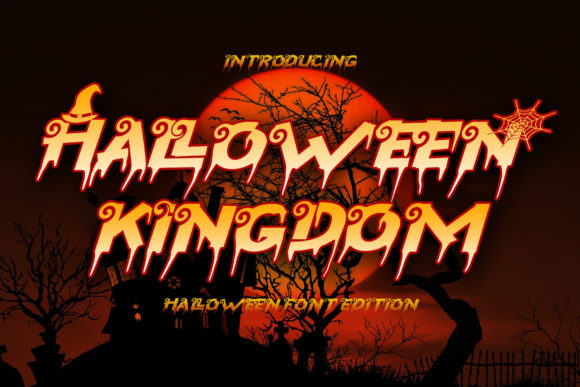
In the landscape of digital design, particularly within seasonal marketing and event planning, visual hierarchy and immediate atmospheric recognition are paramount. For professionals tasked with creating Halloween-themed assets—ranging from social media graphics and email newsletters to physical posters and merchandise—the choice of typography is not merely aesthetic; it is a functional component of communication. Halloween Kingdom emerges as a specialized tool in this context, offering a distinct blend of cool creepiness and structural clarity that distinguishes it from generic horror fonts.
This article examines how Halloween Kingdom fits into broader creative workflows, focusing on its technical specifications, specifically its PUA (Private Use Area) encoding, and how designers, marketers, and content creators can leverage these features for efficient, high-quality output. Understanding the mechanics behind such a font allows for smoother integration into existing software ecosystems and ensures consistency across multi-platform campaigns.
Understanding the Technical Foundation: PUA Encoding
Before diving into application, it is crucial to understand what makes Halloween Kingdom technically viable for professional use. Many decorative fonts suffer from limited character sets or rely on standard keyboard inputs that may not support complex ligatures or swashes. Halloween Kingdom utilizes PUA encoding, a method where glyphs are mapped to unused code points in the Unicode Private Use Area.
For the workflow-oriented designer, this offers significant advantages:
- Complete Glyph Access: You are not restricted to basic alphanumeric characters. The font includes a comprehensive library of ornaments, special symbols, and decorative variants that are essential for thematic designs.
- Swash Integration: Swashes—decorative extensions of letters—are often difficult to implement in standard fonts. With PUA encoding, these elements are accessible directly through the font’s internal map, allowing for precise control over typographic flourish without relying on third-party plugins or manual vector manipulation.
- Compatibility Management: While PUA fonts require specific handling in some legacy systems, modern design suites (Adobe Creative Cloud, Affinity Suite, Canva Pro, etc.) handle them seamlessly. Knowing this allows you to set up your style guides early in the project phase, ensuring that all team members know how to access these extended characters.
This technical robustness means less time troubleshooting missing characters and more time focusing on layout and composition. It transforms the font from a simple text element into a modular toolkit for decoration.
Strategic Placement in Design Projects
Integrating Halloween Kingdom effectively requires understanding its role within the visual hierarchy. As a display font, it is designed to be read at large sizes, making it ideal for headlines, titles, and key focal points rather than body copy. Its "cool and creepy" aesthetic suggests a tone that is playful yet eerie, suitable for brands that want to engage their audience without inducing genuine fear.
Pre-Production and Planning
During the conceptualization phase, Halloween Kingdom should be evaluated alongside other brand assets. If your brand voice is typically minimalist or corporate, introducing this font signals a temporary shift in tone for the holiday season. This decision should be documented in your campaign brief. Consider how the font’s sharp angles and irregular structures will interact with your primary brand colors. Typically, Halloween Kingdom performs best against dark backgrounds (blacks, deep purples, midnight blues) or high-contrast light backgrounds (creams, stark whites).
Create a dedicated "Holiday Typography" style guide section. Define which PUA glyphs will serve as bullet points, separators, or corner accents. By pre-selecting these elements, you maintain consistency across all deliverables, from web banners to print materials.
Execution and Layout
When executing designs, the process involves balancing the density of the font with negative space. Halloween Kingdom is visually heavy; therefore, it demands room to breathe. Avoid cluttering the design with excessive competing elements.
Tip: Use the PUA-encoded swashes to frame content rather than just decorate it. For example, place a left-facing swash glyph at the beginning of a headline and a right-facing one at the end to create a contained visual block. This technique guides the viewer’s eye naturally across the message.
In digital marketing, where attention spans are short, the instant recognizability of Halloween Kingdom helps capture interest within the first few seconds of viewing. In email marketing, use the font sparingly in the subject line preview or header image to drive open rates, while keeping the body text in a highly readable sans-serif or serif font to ensure accessibility and legibility.
Workflow Efficiency and Asset Management
For freelancers and small business owners managing multiple client projects, efficiency is key. Halloween Kingdom’s PUA nature requires a specific approach to file organization and asset management to prevent errors.
- Font Installation Verification: Before starting any project, verify that the font is installed correctly on all devices used by your team. Test a sample document containing various PUA characters to ensure they render as expected.
- Layer Naming Conventions: When working in vector software like Illustrator or Inkscape, name layers containing Halloween Kingdom text distinctly (e.g., "Headline_HK_Main," "Accent_Swash_PUA"). This prevents confusion when collaborating with other designers who may not have the font installed.
- Export Settings: If delivering final files to clients who may not have the font, outline the text paths. This converts the editable text into vector shapes, preserving the appearance of the PUA glyphs regardless of the recipient’s system. However, keep an editable .ai or .psd version archived for future revisions.
This disciplined approach to asset management reduces revision cycles and ensures that the "cool and creepy" aesthetic remains intact throughout the production pipeline.
Interactions with Other Design Elements
Halloween Kingdom does not exist in isolation. Its effectiveness depends on how well it interacts with imagery, color palettes, and other graphical elements.
Imagery Synergy
The font’s jagged, kingdom-like structure pairs well with gothic architecture, haunted house illustrations, or vintage horror movie posters. Avoid pairing it with overly soft or organic imagery, such as watercolor florals, unless the contrast is intentional for a specific artistic effect. The clash between the font’s rigid, spooky geometry and soft imagery can create a unique, avant-garde look, but it requires careful balance to avoid visual chaos.
Color Psychology
The font’s impact is amplified by color choices. Orange and black remain classic, but consider expanding the palette to include muted tones like slate gray, forest green, or blood red for a more sophisticated, mature appeal aimed at the 25–50 demographic. These colors align with current trends in premium Halloween branding, moving away from cartoonish aesthetics toward atmospheric elegance.
Long-Term Utility and Versatility
While Halloween Kingdom is inherently seasonal, its utility extends beyond October. The "Kingdom" aspect of the name and its regal, albeit spooky, structure allow it to fit into fantasy-themed projects, medieval game assets, or even academic presentations on folklore and history. This versatility adds value to your license, making it a worthwhile investment for creators who work across multiple genres.
Furthermore, the PUA encoding ensures that the font remains relevant as design trends evolve. Unlike fonts that rely on trendy stylistic quirks that may fade quickly, Halloween Kingdom’s foundational design principles—clarity mixed with thematic decoration—provide a timeless quality. This longevity supports long-term brand consistency for businesses that incorporate seasonal themes into their annual marketing calendar.
Quality Control and Accessibility
Finally, always prioritize accessibility and readability. While Halloween Kingdom is striking, it can become illegible at small sizes or low resolutions. Implement a quality control checklist for every project:
- Contrast Check: Ensure sufficient contrast between the font color and background.
- Size Thresholds: Do not use Halloween Kingdom for body text smaller than 14pt in print or equivalent pixel sizes in digital formats.
- Screen Testing: View designs on mobile devices to ensure the intricate PUA glyphs do not blur or break rendering on smaller screens.
By treating Halloween Kingdom not just as a decorative add-on but as a core component of your typographic strategy, you enhance the overall professionalism and impact of your Halloween designs. Its ability to stand out instantly, combined with the technical ease of PUA access, makes it an indispensable asset for any creator looking to elevate their seasonal output.