Wulkie: The Casual Display Font That Actually Works
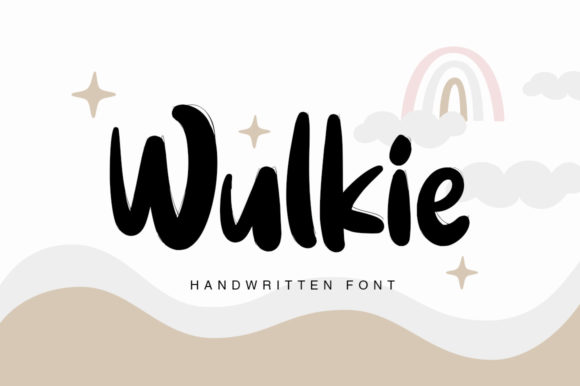
We’ve all been there. You’re finalizing a project—maybe it’s a blog post header, a social media graphic for your small business, or a presentation slide—and you stare at the screen. The content is solid, but the typography feels stiff. It looks like everything else on the internet. This is where Wulkie steps in. It isn’t just another decorative typeface; it’s a cool, casual display font designed to break that monotony without sacrificing readability.
If you are building a brand identity, creating educational materials, or just trying to make your personal website feel more human, Wulkie serves as an incredible asset to your fonts library. Its potential to elevate any creation lies not in complex ligatures or exotic styling, but in its ability to feel approachable. Let’s look at why this specific font works so well across different scenarios and how you can apply it effectively.
Why "Cool and Casual" Matters in Design
In a digital landscape saturated with corporate sans-serifs and overly ornate scripts, standing out often means leaning into personality. Wulkie captures a vibe that is relaxed yet professional enough for commercial use. It avoids the trap of looking too childish while still maintaining a friendly demeanor. For creators and marketers, this balance is crucial.
When users encounter a design that feels too rigid, they often subconsciously distance themselves from the message. Conversely, if something feels too informal, it might lack authority. Wulkie hits the sweet spot. It suggests confidence without shouting. Whether you are designing a menu for a local cafe or a title card for a YouTube tutorial, this font signals that the content is accessible and modern.
Real-World Applications Across Industries
Understanding where to use Wulkie is just as important as knowing what it is. Here are several realistic scenarios where this font adds immediate value.
For Digital Marketers and Content Creators
Social media is a visual-first environment. Your audience scrolls quickly, and their eyes are drawn to contrast and character. Using Wulkie for headlines in Instagram carousels, Pinterest pins, or blog headers can significantly increase engagement rates. Because it is a display font, it commands attention without requiring heavy graphic overlays.
- Email Marketing: Use Wulkie for subject lines or key call-to-action buttons. It breaks up the text-heavy nature of newsletters and guides the eye naturally.
- YouTube Thumbnails: Short, punchy text overlaid on images needs to be legible at small sizes. Wulkie’s casual structure ensures it remains readable even when scaled down.
For Small Business Owners and Retailers
If you run a boutique, a coffee shop, or a freelance service, your branding needs to reflect your unique voice. A generic font can make a specialized business feel mass-produced. Wulkie allows you to inject personality into signage, packaging, and promotional materials.
Imagine designing a price list for a farmers market stall. A traditional serif might feel too academic, while a handwritten script might be hard to read from a distance. Wulkie offers a clean, modern look that feels handcrafted but structured. It tells customers, "We care about details, but we’re easy to talk to."
For Educators and Presenters
Education is shifting towards more engaging, visually dynamic formats. Whether you are a teacher creating worksheets for younger students or a corporate trainer preparing slides for adults, visual hierarchy is key. Wulkie works exceptionally well for section headers, quiz titles, or emphasis points.
It helps reduce cognitive load by making dense information feel less intimidating. When used in e-learning modules or PDF guides, it keeps the learner engaged by providing visual variety without distraction.
Practical Tips for Using Wulkie Effectively
Having the font is only half the battle. To truly leverage Wulkie, you need to understand how to pair it and where to place it. Here are some practical guidelines to ensure your designs look polished rather than cluttered.
- Pairing is Key: Since Wulkie is a display font, it should generally be used for short text—titles, headlines, and labels. Pair it with a neutral body font like a simple sans-serif (e.g., Arial, Helvetica, or Open Sans) for paragraphs. This creates a clear hierarchy where the eye knows exactly where to look first.
- Don’t Overuse It: Display fonts lose their impact when overused. If every line of text is in Wulkie, the design becomes noisy and difficult to scan. Reserve it for moments where you want to emphasize a point or set a tone.
- Consider Context: While Wulkie is versatile, it may not be suitable for legal documents, financial reports, or highly technical manuals where neutrality and strict readability are paramount. In these cases, stick to more traditional typefaces.
What to Consider Before Downloading or Buying
Before adding Wulkie to your toolkit, there are a few logistical factors to keep in mind. First, check the licensing terms. Some fonts are free for personal use but require a commercial license for business projects. As a freelancer or business owner, ensuring you have the right to use the font in client work is essential to avoid legal issues.
Second, consider file compatibility. Ensure the font comes in standard formats like .OTF or .TTF that are compatible with your design software, whether that’s Adobe Illustrator, Canva, Microsoft Word, or Figma. Many modern platforms support web fonts, which is useful if you plan to embed Wulkie directly into your website CSS for consistent branding across devices.
Finally, test it in context. Don’t just look at the alphabet sample. Create a mockup of a real-world asset—a business card, a banner ad, or a book cover—and see how Wulkie performs. Does it feel balanced? Does it clash with your color palette? Sometimes a font looks great in isolation but falls flat in application. Iteration is part of the process.
The Bottom Line
Wulkie is more than just a stylistic choice; it’s a strategic tool for communication. By choosing a cool, casual display font, you are signaling openness, creativity, and modernity. Whether you are a seasoned designer looking to refresh your portfolio or a hobbyist starting your first blog, Wulkie provides the flexibility to make your work stand out.
Remember, good design is invisible. It doesn’t scream for attention; it facilitates understanding. Wulkie achieves this by providing a familiar, comfortable reading experience that still feels distinct. It elevates your creation not by being loud, but by being right. So, next time you’re stuck on a design problem, try swapping out your default header font for Wulkie. You might find that the perfect solution was waiting in your library all along.