Caldera: Elevating Children’s Designs with a Cute and Bubbly Display Font
When designing for children, the visual language you choose speaks volumes before a single word is read. The right typography can transform a simple flyer into an invitation to adventure, or turn a basic classroom label into a cherished keepsake. For designers, educators, and parents looking to inject personality, warmth, and playfulness into their projects, Caldera stands out as a premier choice. This cute and bubbly display font offers more than just aesthetic appeal; it provides a versatile tool that brings joy and clarity to children-themed designs.
Understanding the Appeal of Caldera
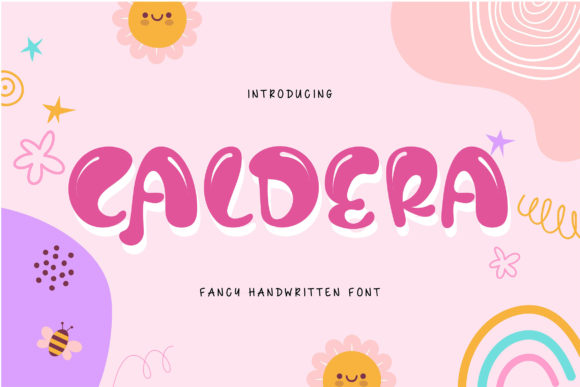
At its core, Caldera is a display font designed to capture attention through its distinctive, rounded forms. Unlike standard serif or sans-serif typefaces that prioritize readability in long-form text, display fonts like Caldera are meant to be seen. They act as visual anchors, setting the tone for the entire design. The "bubbly" nature of the letters suggests softness, safety, and fun—qualities that resonate deeply with young audiences and the adults who create content for them.
The font’s unique character lies in its ability to balance whimsy with structure. While it is undeniably playful, it maintains enough legibility to ensure that messages are communicated effectively. Whether used for a birthday party banner, a kindergarten curriculum cover, or a children’s book title, Caldera delivers a consistent message of cheerfulness and engagement. Its thick strokes and smooth curves make it particularly effective when paired with bright colors, creating high-contrast visuals that pop on both digital screens and printed materials.
Solving Common Design Challenges in Kids’ Content
Creating effective design for children often involves navigating several challenges. Designers must strike a delicate balance between being engaging without being overwhelming, and being informative without being boring. Additionally, there is the technical hurdle of ensuring that special characters, symbols, and decorative elements are accessible and easy to implement.
This is where the technical specifications of Caldera become a significant advantage. Caldera is PUA (Private Use Area) encoded. For those unfamiliar with this term, PUA encoding allows designers to access all glyphs, swashes, and alternate characters directly from the keyboard or font panel, rather than hunting through complex symbol menus. This means you can access every unique feature of the font with ease, streamlining your workflow and allowing you to focus on creativity rather than technical troubleshooting.
Why Ease of Access Matters
In fast-paced design environments, such as preparing last-minute event decorations or updating educational materials, efficiency is key. With PUA encoding, adding a decorative swirl or a special accent to a headline takes seconds. This accessibility encourages experimentation. You might start with a simple title using the standard alphabet, but once you realize how easily you can swap in a swash variant, you may find yourself enhancing the design further. This flexibility helps solve the common problem of static, rigid designs by inviting dynamic, customized touches.
Practical Applications and Outcomes
The versatility of Caldera makes it suitable for a wide range of applications. Here are some practical ways to utilize this font to achieve specific design outcomes:
- Event Invitations and Decorations: For birthday parties, baby showers, or school events, Caldera sets a festive mood immediately. When combined with bright colors like electric blue, sunshine yellow, or hot pink, the font amplifies the celebratory atmosphere. The bubbly shapes mimic the feeling of balloons and bubbles, reinforcing the theme of fun.
- Educational Materials: Teachers and homeschooling parents can use Caldera for worksheets, flashcards, and classroom labels. The clear, rounded forms are easier for early readers to distinguish compared to more ornate scripts. It helps reduce cognitive load for young learners, making learning materials feel less intimidating and more inviting.
- Brand Identity for Child-Facing Businesses: Daycares, toy stores, and children’s clothing brands can leverage Caldera to build a recognizable and friendly brand voice. A logo or header using this font communicates approachability and trust, which are crucial factors for parents making purchasing or care decisions.
- Digital Content and Social Media: In the age of Instagram and Pinterest, visual appeal is paramount. Caldera works exceptionally well for social media graphics, quote cards, and digital flyers. Its bold presence ensures that text remains readable even on small mobile screens, while its unique style helps content stand out in crowded feeds.
Maximizing Impact Through Color and Context
While Caldera is strong on its own, its true potential is unlocked when combined with thoughtful color choices. The recommendation is to pair the font with vibrant, saturated hues. Bright colors enhance the "bubbly" aesthetic, creating a sense of energy and optimism. However, contrast is equally important. Ensure that the text color contrasts sharply with the background to maintain readability. For example, a deep navy background with bright orange Caldera text creates a striking, modern look, while a white background with pastel shades offers a softer, gentler vibe.
Consider the context of your design. If you are creating something for toddlers, lighter pastels and larger letter sizes work best. For older children, such as elementary school students, you might opt for bolder primary colors and incorporate the swashes more liberally to add flair. Understanding your audience’s age group will help you tailor the use of Caldera to be most effective.
Implementation Tips for Different Users
How you approach Caldera will depend on your role and expertise level.
For Professional Designers: Focus on hierarchy and integration. Use Caldera for headlines and key messaging, but pair it with a highly readable body font for longer texts. This combination leverages Caldera’s display strength while maintaining usability. Utilize the PUA-encoded swashes sparingly to highlight specific words or initials, adding a touch of customization without cluttering the design.
For Educators and Parents: Keep it simple and functional. Use Caldera for titles of projects, names on cubbies, or headings in newsletters. Most modern word processors and design tools allow you to install custom fonts easily. Once installed, you can access the full range of glyphs via the font panel. Don’t be afraid to experiment with different sizes and colors to see what captures your child’s or students’ attention best.
For Small Business Owners: Consistency is key. Incorporate Caldera into your brand guidelines. Use it across business cards, signage, and online platforms to create a cohesive visual identity. The friendly nature of the font will help humanize your brand, making it more relatable to families.
Conclusion
Caldera is more than just a font; it is a design solution for anyone looking to connect with children on a joyful, engaging level. Its cute and bubbly aesthetic, combined with the technical convenience of PUA encoding, makes it an invaluable asset in your design toolkit. By understanding how to apply it effectively through color, context, and hierarchy, you can create materials that not only look great but also resonate emotionally with your audience. Whether you are planning a party, teaching a class, or building a brand, Caldera offers the perfect blend of charm and functionality to bring your ideas to life.