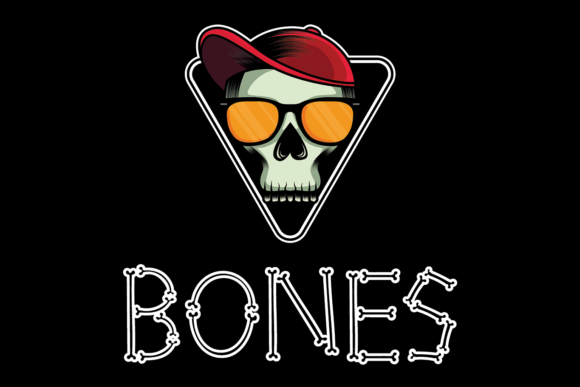
Bones: A Strategic Approach to High-Impact Typography for Seasonal Design
In the landscape of digital and print design, typography is rarely just about readability; it is a primary vehicle for mood, authority, and immediate visual communication. When integrating a display font like Bones into a creative workflow, particularly for time-sensitive campaigns such as October-themed projects, the decision must be grounded in practical execution rather than aesthetic whim. Bones is not merely a decorative element; it is a structural component that can define the hierarchy and emotional tone of a layout. This article outlines how to effectively integrate this specific typeface into professional workflows, ensuring that its "creepy yet cool" aesthetic serves a clear functional purpose.
Understanding the Asset: Visual Weight and Psychological Impact
Before implementation, one must understand the asset’s inherent properties. Bones is characterized by its skeletal structure—simple, bold, and unadorned. Unlike ornate serif fonts that require significant white space to breathe, or thin sans-serifs that demand high-resolution rendering to maintain legibility, Bones relies on negative space and stark contrast. The font’s design evokes themes of decay, structure, and mystery, making it an ideal candidate for Halloween marketing, horror-themed educational materials, or edgy brand activations during the autumn season.
The psychological impact of Bones lies in its simplicity. It does not compete with imagery; it anchors it. For designers and marketers, this means that using Bones allows other visual elements—photography, illustrations, or color palettes—to take center stage without creating visual noise. However, because the font has such a strong visual effect, it requires careful handling. Overuse leads to fatigue, while underuse may fail to communicate the intended seasonal urgency. Understanding this balance is the first step in efficient project planning.
Pre-Production: Planning and Compatibility Checks
Effective integration of any font begins before the design software is even opened. In a professional workflow, pre-production involves verifying technical compatibility and establishing usage guidelines. Bones, being a display font, typically comes in limited weights (often regular and bold). This limitation is actually a strength for consistency but a constraint for flexibility.
- Licensing Verification: Ensure the license covers both digital and print media if the campaign spans multiple channels. Missteps here can lead to costly legal issues later in the production cycle.
- Font Pairing Strategy: Bones should not stand alone in body text. Plan for a complementary typeface for longer passages. A clean, neutral sans-serif like Helvetica Now or a highly readable serif like Merriweather provides the necessary counterpoint. The pairing process should be tested early to ensure that the "cool" factor of Bones does not overwhelm the informational clarity required for calls-to-action or detailed descriptions.
- Asset Organization: Store the .otf or .ttf files in a centralized library with clear naming conventions. If working within a team, ensure that all collaborators have access to the font to prevent substitution errors, which can ruin the intended visual hierarchy upon export.
Implementation in Layout and Hierarchy
During the execution phase, Bones functions best as a headline or a key visual anchor. Its strength lies in its ability to command attention at large sizes. When designing posters, social media banners, or email headers for October campaigns, apply Bones to the primary message only. Secondary information should remain subordinate.
Kerning and Tracking Adjustments
One critical aspect of using Bones is manual adjustment of spacing. Display fonts often have tight default kerning pairs that look chaotic when scaled up. For instance, the combination of 'V' and 'A' or 'W' and 'O' may require slight tightening or loosening to maintain optical balance. In a workflow focused on quality control, always zoom out to view the headline at its final display size. What looks balanced on screen may appear disjointed when printed on a billboard or viewed on a mobile device.
Color and Contrast Integration
The "creepy" aesthetic of Bones is amplified by color choice. While traditional orange and black are standard for October, consider varying the palette to avoid cliché. Deep purples, desaturated greys, or stark whites against dark backgrounds can make the font pop more effectively. When applying colors, ensure sufficient contrast ratios for accessibility standards (WCAG). Even stylized text must be legible to users with visual impairments. Using tools to check contrast ratios during the design phase ensures that the aesthetic appeal does not come at the cost of inclusivity.
Cross-Platform Consistency and Adaptation
A common pitfall in modern design workflows is failing to adapt assets across different mediums. Bones may render beautifully in Adobe Illustrator for a print brochure but might suffer from aliasing or poor scaling in web environments if not properly optimized. For web implementations, consider converting the font to WOFF2 format to ensure fast loading times without sacrificing quality. Alternatively, use SVG text for static headlines where dynamic resizing is not required, preserving the crisp edges of the glyph shapes.
When collaborating with developers or content managers, provide clear specifications. Document the font weights used, the pairing typefaces, and the minimum size requirements for legibility. This documentation acts as a bridge between the creative vision and technical execution, reducing back-and-forth revisions and ensuring that the final output matches the initial mockup.
Maintaining Quality Control and Long-Term Use
Once the design is finalized, quality control checks are essential. Review the text for ligature issues, especially if the font includes special character sets. Check for alignment problems in justified text blocks, although Bones should primarily be used in left-aligned or centered layouts to maintain its structural integrity. Additionally, test the design in grayscale to ensure that the hierarchy holds up without reliance on color alone.
For long-term use, archive the project files with embedded fonts or linked assets clearly marked. This practice facilitates future updates or reprints. If Bones becomes part of a recurring seasonal theme, create a style guide entry that defines its proper usage. This might include rules such as "Never use italicized versions," "Always pair with [Secondary Font]," or "Minimum size of 48pt for digital headers." Establishing these boundaries helps maintain brand consistency over time and prevents the font from being misused in contexts where it lacks impact.
Strategic Considerations for Marketers and Educators
For marketers, Bones offers a low-cost way to signal seasonal relevance without extensive custom illustration. By leveraging the font’s existing cultural associations, campaigns can quickly resonate with audiences familiar with October themes. However, authenticity matters. Ensure that the surrounding copy and imagery support the tone set by the font. A mismatch between a spooky headline and a generic corporate image can confuse the audience and dilute the message.
Educators and bloggers can utilize Bones to break up dense text or highlight key concepts in course materials or blog posts. The font’s distinctiveness makes it excellent for pull quotes or section headers, guiding the reader’s eye through complex information. In educational contexts, clarity remains paramount; use Bones sparingly to avoid distracting students from the core learning objectives.
Conclusion on Workflow Integration
Integrating Bones into your design process is less about finding a "cool" font and more about executing a deliberate visual strategy. By approaching the font with a focus on preparation, precise implementation, and rigorous quality control, creators can harness its unique aesthetic to produce compelling, effective designs. Whether for a small business promotion, a personal creative project, or a large-scale marketing campaign, understanding how to wield Bones responsibly ensures that the final output is not only visually striking but also professionally sound. The key lies in respecting the font’s limitations while maximizing its strengths within a structured, well-planned workflow.